Recommended Services


Supported Scripts
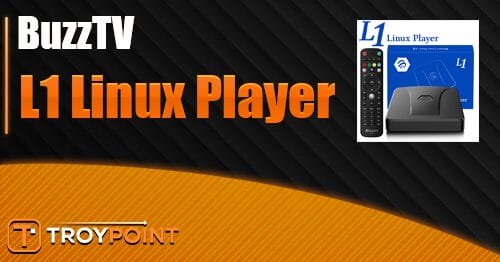

This BuzzTV L1 Linux Player review will cover the important details regarding this stripped-down IPTV device. This is not an Android streaming system, and it’s specifically engineered for users strictly dedicated to IPTV services.

I received this box a few weeks ago and have been using it on and off during that timeframe. Although this box was gifted to me by BuzzTV, that gratuity doesn’t change my honest opinions provided in the review below.
If you’re a TROYPOINT Patron, you can find my First Impressions Video and full setup guide at the following link:
BuzzTV L1 Linux Player First Impressions & Setup

Advertised Features & Hardware Specs
- Linux Operating System
- 8GB Internal Storage
- 2GB RAM
- 4K Ultra HD Resolution Support
- 1x USB 3.0 Port
- Standard 10/100 Ethernet (Not Gigabit)
- Proprietary BuzzTV 6 Linux App (IPTV Player)
- Infrared (IR) Remote Control

Operating System: Why Linux?
The fact that the BuzzTV L1 is running the Linux operating system is news in itself. Most modern streaming boxes run some form of Android OS or Google TV, making this a noticeable departure.
Why Linux? Here’s what the BuzzTV website states:
Hide Your Digital Fingerprint
IP Address
2a02:4780:3f:1900:0:33ad:4392:1
Location
Frankfurt am Main, Hesse
ISP
Hostinger International Limited
Limited Time: 85% Off + 3 Months FREE
“Linux is known for its stability, efficiency, and security. By leveraging the lightweight Linux OS, the BuzzTV L1 delivers seamless streaming without the additional customization and apps on Android. Eliminating these allows the L1 to dedicate more of its processing power to streaming. The BuzzTV L1 aims to offer a simpler and more straightforward approach to streaming.”
The first question most cord-cutters will ask is whether or not you can install Linux applications (or Android APKs) onto this device. Unfortunately, the answer is no.
Does Sideloading Work? (Limited Functionality)
Because this is a completely closed-ecosystem Linux build, you cannot sideload third-party applications.
The BuzzTV L1 Linux Player is designed for exactly one purpose: streaming IPTV services. You cannot install Netflix, Prime Video, Stremio, or Kodi.
BuzzTV is actively catering to less technical users here. The user interface is incredibly simple with very limited settings. When I first started testing this, I thought it would be perfect for my older dad who is technically challenged. Given that many people can now find everything they need directly through their IPTV service, there may be some niche interest in this bare-bones device.
User Interface & Custom Launchers
Because you cannot install third-party apps, you also cannot install custom third-party launchers like Wolf Launcher or Projectivy. You are permanently locked into the native UI.
That said, I do like the native BuzzTV L1 user interface. It’s extremely simple to use, and everything is only a click or two away. It includes a live preview pane that displays the last channel that was playing (you can disable this by pressing the play/pause button on the remote).
It also displays your favorited channels along the bottom of the home screen. However, it would be a huge improvement if we could pin our favorite VOD movies and TV shows to this screen as well.

Sick of Slow, Rural Internet?
Whether you live out in the country or take your RV off the grid, Starlink delivers blazing-fast internet to areas that traditional providers ignore.

BuzzTV 6 Linux App (The Core Player)
This is the primary IPTV application baked directly into the firmware. It is very similar to the robust IPTV player interface we see on BuzzTV’s high-end Android systems.

It does almost everything you need it to do—except for recording. For some reason, recording does not work on the BuzzTV L1 Linux Player. While this isn’t a massive issue for most streamers (since modern VOD libraries cover most missed broadcasts), the device includes a high-speed USB 3.0 port that absolutely should allow for recording to external storage.
Overall, the BuzzTV 6 Linux App provides excellent, stable access to live TV channels, VOD movies, and TV shows.
VPN Compatibility Issues
Because we can’t install outside applications from the Google Play Store or sideload APKs, there is no way to run a native VPN app (like Surfshark or ExpressVPN). You are forced to use the manual VPN configuration option within the network settings.
BuzzTV provides the ability to set up a manual OpenVPN connection. I tested this by putting my OpenVPN configuration file onto a USB drive. The box recognized the file, but threw a persistent error: “VPN configuration was not saved.”

I tried different configurations within the VPN file for a good hour but couldn’t establish a handshake. In fairness to BuzzTV, I did not reach out to support to rectify this bug, but a core privacy feature should work out of the box.
If you require encryption when streaming your IPTV service on this device, you will need to connect it to a dedicated VPN router.
The IR-55 Remote Control
The remote that comes with the BuzzTV L1 is their IR-55 Remote. I really wish streaming device manufacturers would stop including ancient Infrared (IR) remotes and switch to Bluetooth entirely. IR requires a direct line of sight to the box, meaning you cannot hide the device behind your TV.

Big Tech is Scanning Your Emails
Stop letting free providers read your private messages to build advertising profiles on you. Take back your digital privacy with a secure, ad-free inbox.
Save 50% on Your First Year of StartMail
I even tried plugging in a wireless USB dongle for a spare remote I had laying around, and the Linux OS refused to recognize it.
What’s In The Box?

- L1 Linux Player Set-Top Box
- Power Cord
- 2x AAA Batteries
- IR-55 Remote
- HDMI Cable
- User Manual
Pros & Cons
Pros
- Extremely user-friendly interface for non-technical users.
- The proprietary BuzzTV 6 Linux App works great for managing playlists.
- Plays IPTV live channels and VOD libraries reliably with zero background bloatware.
- Clean 4K video output.
Cons
- Closed ecosystem: Cannot install or sideload any 3rd-party apps (No Kodi, Stremio, Netflix, etc.).
- Recording functionality is disabled despite having a USB 3.0 port.
- Manual OpenVPN configuration is buggy and failed to load.
- Uses an outdated Infrared (IR) remote control instead of Bluetooth.
- High price point compared to versatile Android TV competitors.
Final Thoughts & Summary
I was genuinely excited when I first started using this device because I thought there could definitely be a niche market for a bare-bones, ultra-stable IPTV terminal. But I always go back to the highly reliable Onn 4K Pro and ask: Why would someone buy the BuzzTV L1 Linux Player over that?
This is a question that continually arises for hardware manufactured by smaller operations. Since we can easily install 3rd party launchers on standard Android TV boxes, we can already simplify the user interface for older or technically challenged family members without locking them out of other apps entirely.
Here are a few firmware and hardware updates I think could save this device:
- Bluetooth remote: I absolutely despise IR remotes in 2026.
- Native Media Apps: Bake the Kodi application and Stremio directly into the Linux build.
- WireGuard Support: Add a functional WireGuard VPN protocol connection within the network settings.
I’m not asking for a lot in the list above, and I think those additions would make a massive difference. Adding Kodi and Stremio would open up endless VOD possibilities that the user might not find through their IPTV provider. WireGuard is also critical, as it provides the fastest download speeds to prevent buffering.
Price is the final major factor. I know it’s hard for smaller companies to compete with retail giants, but it is very difficult to justify selling this locked-down device for $89.99 when you can buy the fully unlocked, heavily certified Onn 4K Pro for $49.99. (More than likely, Onn is selling their devices at a loss and making up the difference through streaming service ad revenue, but the market reality remains the same).
Due to the high price and the severe functionality shortcomings mentioned above, I cannot recommend purchasing the BuzzTV L1 Linux Player at this time. We will keep this page updated if BuzzTV pushes major firmware improvements.
Buy the BuzzTV L1 Linux Player
This page includes affiliate links where TROYPOINT may receive a commission at no extra cost to you. Many times, visitors will receive a discount due to the special arrangements made for our fans. Learn more on my Affiliate Disclaimer page.
Share this Post